
Contact & FAQ
Find answers to common questions about the Warrant Inquiry Portal, or reach out to our team for assistance.
A. No, there is no cost to the agency for each user login.
A. Yes, after your request has been completed you will be able to see the status through your dashboard. For STD 435 requests, you will also be able to download a completed copy of the STD 435 form.
A. The procedure for field entry is detailed enough to provide sufficient guidance. If further assistance is needed, please reach out during the testing period for additional support.
A. All requests are processed in the order they are received. If this request requires special review, is an expedite request, or is for a Stolen Warrant, send an email to the Post Issuance Unit supervisor. See SAM 8426 and SAM 8426.1 for additional information.
A. Yes, an upload file option is available for batching multiple warrant numbers.
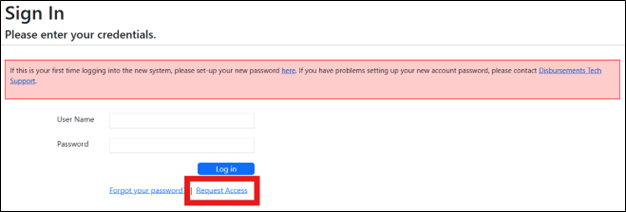
A. Use the Request Access button from the Sign In page to request access:
A. There is no deadline for submitting requests. Disbursements will review and process requests within 10 business days.
A. If this request requires special review, is an expedite request, or is for a Stolen Warrant, send an email to the Post Issuance Unit supervisor. See SAM 8426 and SAM 8426.1 for additional information.
A. Here are the different request statuses you may encounter:
- Placeholder 1
- Placeholder 2
- Placeholder 3
- Placeholder 4
- Placeholder 5
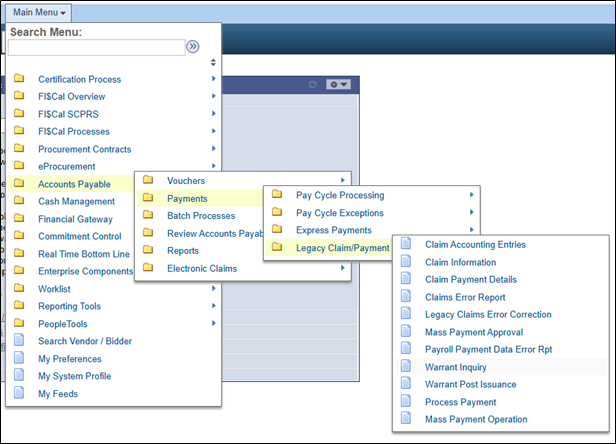
A. Once you have logged into FI$Cal, select the Department Warrant Inquiry from the following path in the Main Menu:
A. See the table below to learn how to determine the general status of each warrant:
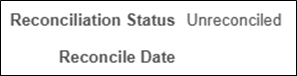
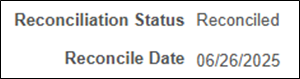
| Reconciliation Status | Reconcile Date | Example | Description |
|---|---|---|---|
| Unreconciled | No Date |
|
Outstanding: The warrant is outstanding; it has not been reconciled/cashed. A form STD 435 or CD-113B may be submitted to request a Duplicate/Replacement warrant. |
| Reconciled | Date |
|
Paid: The warrant has been reconciled and has been cashed. The Reconcile Date is the paid date. |
| Reconciled | No Date |
.png)
|
Reconciled: This warrant has Stale Dated or has been Redeposited and is no longer an active warrant. The funds have been returned to the issuing agency. |
If you have any other questions, please reach out to us: